
Finances at Your Fingertips
Manage your bank accounts from virtually anywhere with Equity Bank’s digital banking.
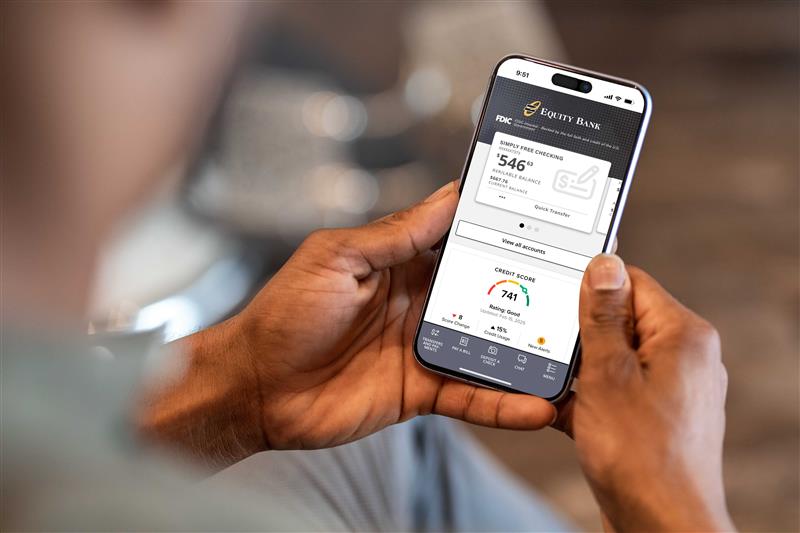
Digital Banking Features
Instant Transfers
Move money with a tap of your finger.
Budget Tracker
Watch your income, spending, and card usage to save for the future.
Savvy Money
Use our free online credit reporting tools , to help you monitor and improve your credit score.
SimplyInvest*
The digital wealth management platform with automated account analysis and rebalancing tools.
Zelle®
A convenient way to send and receive money with friends, family, and small businesses you trust.
Account Alerts
Set custom notifications so you hear instantly when a transaction happens.
AutoSave
Every time you use your debit card, we’ll automatically round up to the nearest dollar and put that money directly into your savings account.
Online Bill Pay
Organize and set up recurring payments for all your monthly bills, from mortgage to electric to water to credit card.
Mobile Deposits
Deposit your checks by taking a picture — no need to visit a bank or ATM.
Commonly Asked Questions
- Log in to Equity Digital Banking, or sign up now
- Select “Statements” from the main menu
- Select “Profile” from the top menu, check the “I agree to receive paperless statements” box, and click “Submit”
- Select “Disclosure” from the top menu and read the agreement
Apple Pay
- Go to the Wallet app and tap Add Credit or Debit Card.
- Follow the steps to add a new card. If your Equity Bank debit card is already connected to your Apple account, simply enter its security code to enroll.
- Tap Next. It takes just a couple minutes to verify your information. After that, tap Next and start using Apple Pay!
Google Pay
- Open the Google Pay app and tap + at the bottom right, then tap Add a credit or debit card.
- Use the camera to capture your card info or enter it yourself.
- If you’re asked to verify your card, choose a verification method from the list. Find and enter the verification code. You’re good to go!
Samsung Pay
- Navigate to and touch Apps > Samsung Pay. Touch Add. Touch Add a credit or debit card.
- Align your card inside the frame. Samsung Pay will automatically detect the card number and expiration date. Enter any remaining required information and touch Next.
- To verify your identity, touch the desired verification method.
- Enter the OTP (One Time Password) and touch Submit.
- Enter your signature and touch Save. To complete the process touch Done.
When you shop with Apple, Google, or Samsung Pay, your card information stays safe, and your actual card number is never sent with your payment. Get peace of mind with one-touch shopping.
Learn more about how Apple, Google, and Samsung Pay protect your information:
Understand your credit score, view your credit report, monitor and improve your credit score inside Online Banking. Equity Bank provides SavvyMoney entirely free of charge and no credit card information is required to register. It’s available inside online banking and it’s ready for your use!
Activate AutoSave, and every time you use your debit card, we’ll automatically round up to the nearest dollar and put that money directly into your savings account. Small change adds up to big savings! Fill out the AutoSave sign up form.
With the Card Suite Lite app, you can control how or when your debit card is used.
Left your card at a restaurant? Lock it until you get back. Traveling on vacation? Choose which cities your card can be used in. Card Suite Lite can help you control, manage, and monitor card usage from your mobile phone, providing real-time transaction alerts. Now you can prevent fraudulent transactions instead of just detecting them after the fact.
How do I sign up?
- You will need your debit card and an email address before downloading the app
- From your app store, search for Card Suite Lite and download
- Open the app once installed and select Sign Up at the bottom of the welcome page
- Complete as prompted and start protecting your card!
Call your local branch and a representative will assist you, or call our Customer Service line at (888) 733-5041.
*Please note that Equity Bank and its subsidiaries offer investment products which are not insured by the Federal Deposit Insurance Corporation (FDIC). These investment products are not deposits or other obligations of, nor are they guaranteed by Equity Bank or any of its subsidiaries and may go down in value.
To send or receive money with Zelle®, both parties must have an eligible checking or savings account. Transactions between enrolled users typically occur in minutes.
Zelle® and the Zelle® related marks are wholly owned by Early Warning Services, LLC and are used herein under license.